uRADMonitor now has a Cities entry in the top menu. It turns the live sensor network into a set of clean, per-city air-quality pages: pick a country, pick a city, and see what the air is doing there right now and over the last 30 days, all from public data the network already collects.
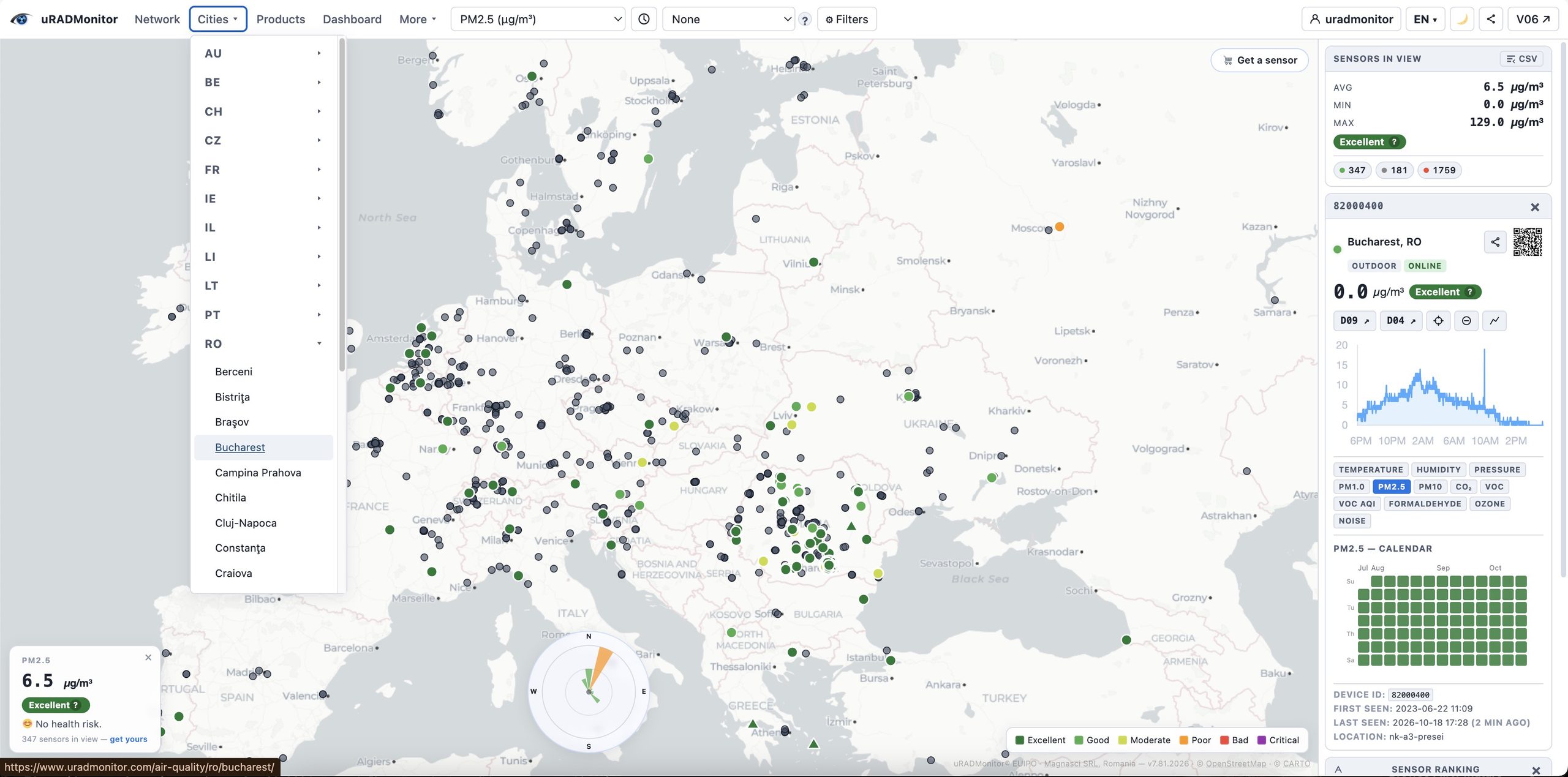
The new Cities menu open in the navigation bar, with the country list expanded
Where to find it
Cities sits in the main navigation, right after Network, on the homepage map and across the site. It opens as a two-level menu: the first level lists country codes (RO, US, DE, and so on), and each country expands to the cities detected there. An All cities link opens the full index at /air-quality/.
What a city page shows
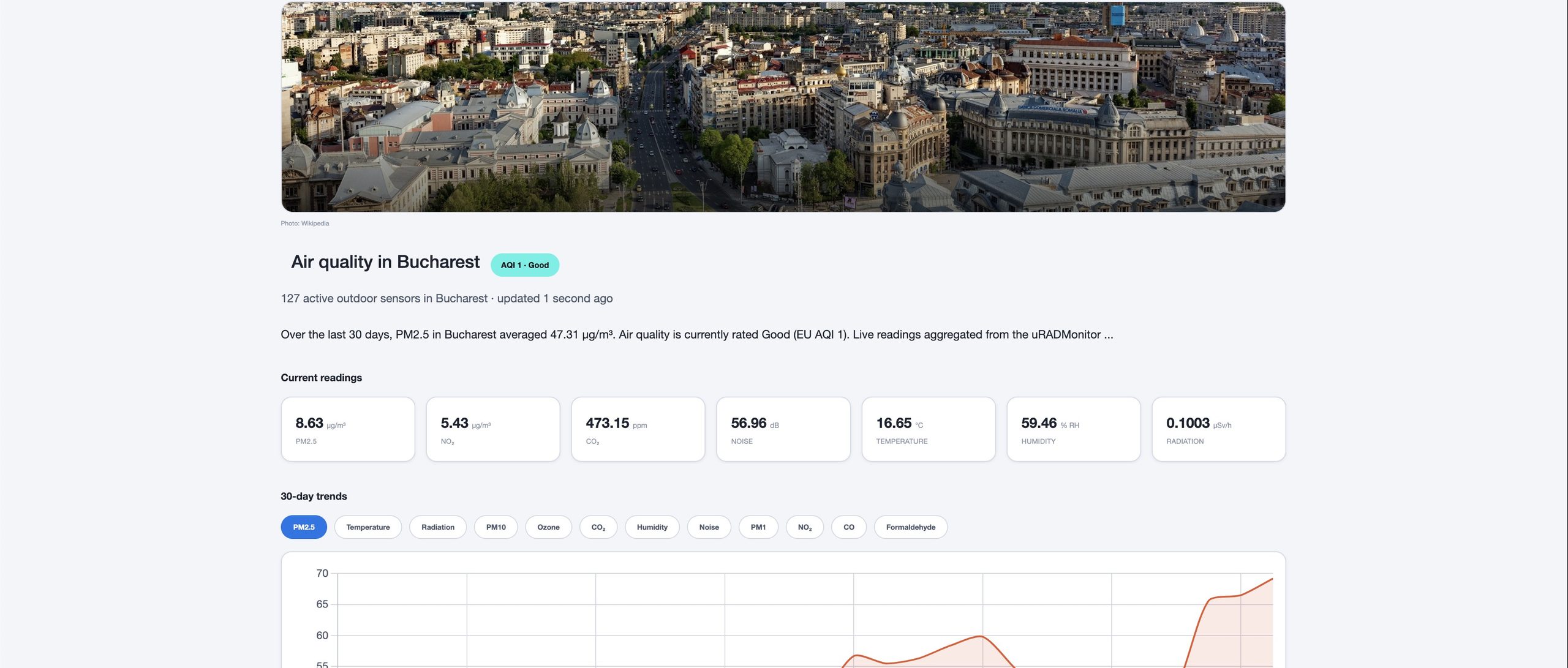
Each city page is a single, readable snapshot of local air quality:
A header photo of the city and an EU AQI badge (the 1 to 6 scale, from Good to Extremely poor) for the current air quality.
A current readings grid averaged across the city’s active sensors: PM2.5, PM10, ozone, NO₂, CO₂, formaldehyde, noise, temperature, humidity, radon and radiation.
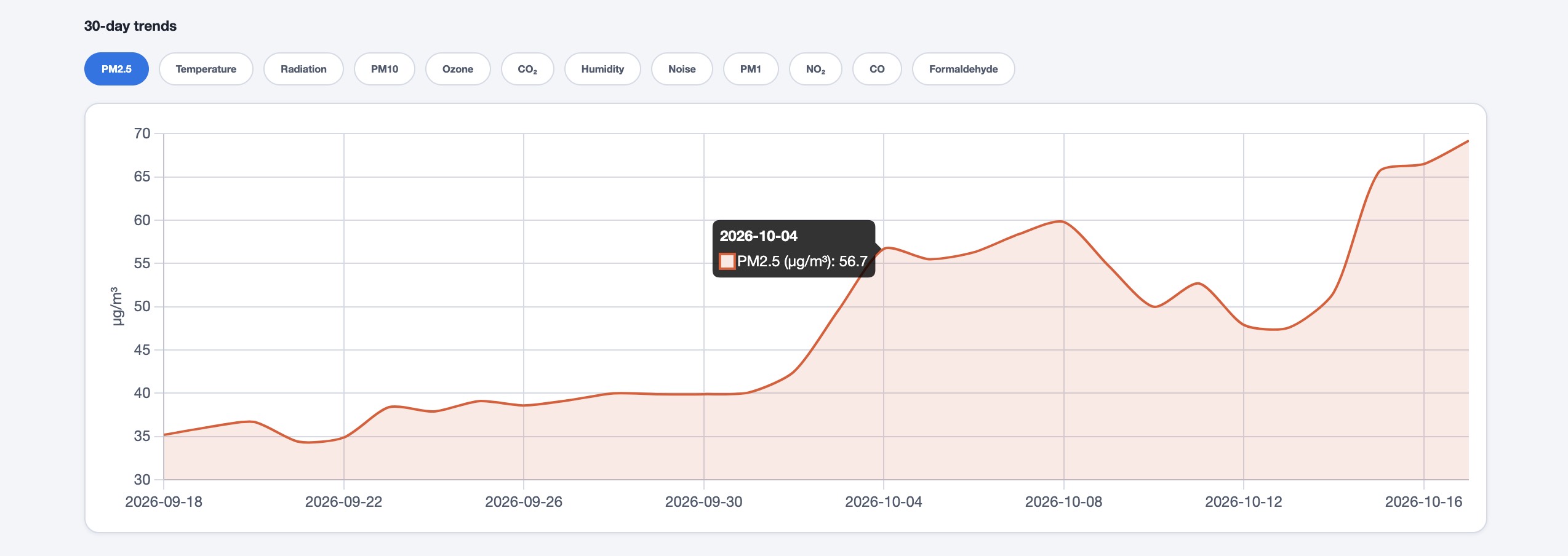
A 30-day trends chart you can switch between parameters, to see how each value moved over the last month.
A 30-day average table and a link to open the live map centered on that city.
Bucharest page presents data from over 100 active sensors.
The 30-day trends chart with one parameter selected, e.g. PM2.5., averaged data from 100 sensors in Bucharest
Why it matters
Air quality is local, but the map answers a broad question (“what is the network seeing?”), not a personal one (“what is the air like where I am?”). The city pages answer the personal one. Each city has its own address you can share, bookmark or send to a local group, instead of a map link with coordinates. And because people search for things like “air quality in Bucharest”, a dedicated page per city is how the network becomes findable to the people who live there, not just to those who already know uRADMonitor.
What’s new
The novelty is that none of this is maintained by hand: the city pages are generated automatically from live network data. A city appears on its own as soon as it has at least two active public outdoor sensors, and it drops off if that coverage goes away. The menu, the index and every page rebuild themselves from the current state of the network, so the list grows as the network grows, with no editing. Romanian cities also carry a Romanian-language section, so the content reads naturally for the local audience and for search.
How it works
Every value on a city page comes from the same public, online outdoor sensors you see on the map. The page averages those sensors into a single city reading for now and for the last 30 days. Radiation, where a Geiger sensor is present, is converted from counts per minute to µSv/h using a characteristic factor obtained from the tube type. Readings are indicative and not a replacement for official regulatory monitoring, but they are live, local and continuous.
Explore your city
Open Cities in the menu and find yours. If it isn’t there yet, your city is one or two sensors away from having its own page: adding a sensor puts it on the map and on its page, and improves coverage for everyone nearby. And on every city page you can subscribe to get a short monthly air-quality summary for that city. Join now!
Liked this? Get monthly air quality findings.
One email a month from the uRADMonitor network. Unsubscribe anytime.
This website uses cookies to improve your experience. We'll assume you're ok with this, but you can opt-out if you wish. Cookie settingsACCEPT
Privacy & Cookies Policy
Privacy Overview
This website uses cookies to improve your experience while you navigate through the website. Out of these cookies, the cookies that are categorized as necessary are stored on your browser as they are essential for the working of basic functionalities of the website. We also use third-party cookies that help us analyze and understand how you use this website. These cookies will be stored in your browser only with your consent. You also have the option to opt-out of these cookies. But opting out of some of these cookies may have an effect on your browsing experience.
Necessary cookies are absolutely essential for the website to function properly. This category only includes cookies that ensures basic functionalities and security features of the website. These cookies do not store any personal information.
Any cookies that may not be particularly necessary for the website to function and is used specifically to collect user personal data via analytics, ads, other embedded contents are termed as non-necessary cookies. It is mandatory to procure user consent prior to running these cookies on your website.


codemore code
~~~~