
Forum Replies Created
-
AuthorPosts
-
July 25, 2026 at 1:38 pm in reply to: A3 HW105 WiFi – Device ID 82600374 – firmware request (no hotspot, 3 beeps) #30399
uRADMonitor
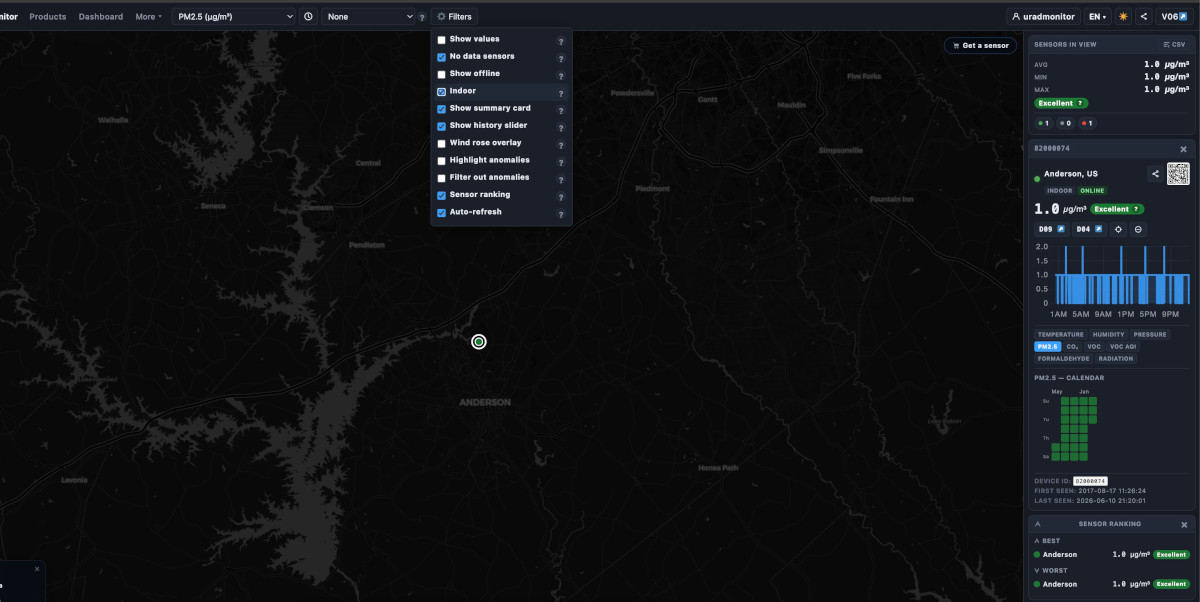
KeymasterJune 10, 2026 at 9:22 pm in reply to: A3 HW105 WiFi – Device ID 82600374 – firmware request (no hotspot, 3 beeps) #30300KeymasterIt’s online already, but marked as INDOOR . So to see INDOOR units, you need to check Filters->Indoor from the top menu. See picture attached.
If theunit is installed outdoors, configure it as “outdoor” under your dashboard account : http://www.uradmonitor.com/dashboard
Attachments:
KeymasterInteresting . The traffic itself is a simple HTTP Post to send the data, not unlike a browser opening a webpage. Good that the problem is gone!
May 18, 2026 at 8:17 pm in reply to: A3 HW105 WiFi – Device ID 82600374 – firmware request (no hotspot, 3 beeps) #30264KeymasterTry here: https://www.uradmonitor.com/wp-admin/post-new.php
Will appear on the blog, http://www.uradmonitor.com/blog
KeymasterUnit seems ok , but traffic to the server is blocked.
Do you ever get anything else than http:0 0/0 ? This means HTTP post return code (must be 200 to reset Watchdog), and x/y is number of successful packets (that got 200) / total packets attempted.
Check the router security , it must be blocking the sensor’s traffic.
KeymasterThis is so cool: https://www.uradmonitor.com/compiling-the-uradmonitor-kit1-firmware-in-visual-studio-code-on-windows/
Congrats on the progress & the article!
What you’re seeing is because usually increasing duty, increases the voltage output, so the code tried to reach the preset voltage of 380V and pushes the duty up to 90% to achieve it, but fails due to hardware constraints.
You could change the code to make it work on a kind of parabola: if goes up to 90% but keep the max voltage reached in a variable, and resorts back to that if all duty interval was checked – instead of remaining stuck at 90%, will then go back to the optimal value.
May 17, 2026 at 1:47 pm in reply to: A3 HW105 WiFi – Device ID 82600374 – firmware request (no hotspot, 3 beeps) #30241KeymasterAmazing! Looking at the photos I was wondering why it is not working – since there was no visible damage, then I saw your second post that it works.
Would you do a short post on the blog on this? Pretty much to sum up what you did and these few pics here? I think it might be helpful to others.
May 11, 2026 at 4:51 pm in reply to: A3 HW105 WiFi – Device ID 82600374 – firmware request (no hotspot, 3 beeps) #30226Keymasterhi Adam . Please post a few pictures with it. Great that you were able to do a little reflow on it, it usually helps – also with getting rid of any humidity buildup.
Now, regarding de ESP04, you should be able to find it online and it is perfectly fine to swap it.
You will need to install a firmware on the new ESP module, than flash the uRADMonitor unit, separately. It is not hard to do.
Directly flashing the new uRADMonitor firmware now will not solve your problem, since the 3 beeps indicates the unit is operational, but cannot properly communicate with the ESP04. We need to start there. Happy to assist you further.
May 10, 2026 at 12:29 pm in reply to: A3 HW105 WiFi – Device ID 82600374 – firmware request (no hotspot, 3 beeps) #30223KeymasterThat might have to do with the network module, a little board based on an esp8266.
Can you take out the front lid and inspect the esp8266 module? Look at the soldering, any corrosion signs, etc.
I can help yuo with the firmware update, but I’m afraid it won’t fix it.
KeymasterWoudl this help? https://www.pocketmagic.net/diyhomemade-geiger-counter-2/
KeymasterMy pleasure.
KeymasterCool! Thanks for the updat.e
KeymasterElectrochemical sensors have a lifespan of about 2 years, so that particular formaldehyde cell should be replaced. No, the alarm is not from that. A firmware update would help: https://www.uradmonitor.com/blog/?s=firmware
KeymasterInteresting design, simple yet effective. Would love to see it should you post a few pics.
KeymasterSounds good! What HVDC did you use?
Would love to see this setup, do you have pictures?
What’s next in your project?
-
AuthorPosts