
Forum Replies Created
-
AuthorPosts
-
uRADMonitor
KeymasterYup, that’s the one. Just remember to set it to 3.3V when using it with the uRADMonitor PCB.
By default it comes configured for 5V, and there is a switch (or a resistor that needs to be cracked/unsoldered) to change it to 3.3V. There is silk print indicating this on one of the sides.
KeymasterSounds great! I’ll just need a few more days to have an automated clone / deployment in place, and all the GIT repos.
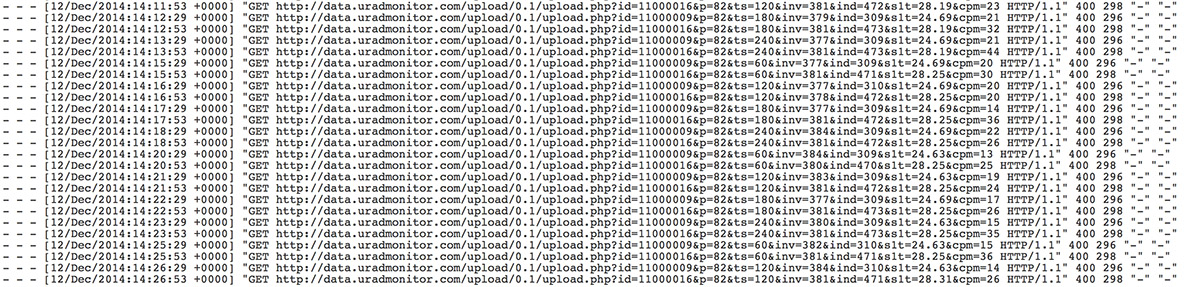
KeymasterIt does look normal, but the header is missing. This results in the 400 Error code. The image shows a dash on each row. For other units there’s the user agent there.
What’s strange is that a few days ago, 11000016 was working fine . Did anything change in the network setup?
For Rick’s unit, 11000009 the problem was from the beginning.
But both units worked perfectly here, while running the tests.
Keymaster@Rick, the problem for 11000009:
[Fri Dec 12 21:46:27 2014] [debug] protocol.c(792): [client 72.47.*.*] Request header field is missing ‘:’ separator: \x01\xff\xff\xff
[Fri Dec 12 21:46:27 2014] [error] [client 72.47.*.*] request failed: error reading the headers
@Lars, the problem for 11000016:
[Fri Dec 12 21:44:42 2014] [debug] protocol.c(792): [client 178.255.*.*] Request header field is missing ‘:’ separator: /\xf3\x01\xff\xff\xff
[Fri Dec 12 21:44:42 2014] [error] [client 178.255.*.*] request failed: error reading the headers-
This reply was modified 11 years, 8 months ago by
uRADMonitor.
KeymasterGood idea. Support forum created and this topic moved.
Regarding the problem, I have investigated things further. Must say this seems to be an elusive bug and I have wasted a few hours to track it already.
Apparently the two units get to the server with their User Agent info stripped. Probably other parts of the packages are changed as well. Also the source IP is null. I don’t know what on their route changes their HTTP headers. Local tests didn’t show this issue, and it is impossible to consider a malfunction of any kind.
I can only assume a firewall would be able to have this intrusive result.
With the User Agent info removed and no source IP, the server denies the packages with a HTTP 400 Error code (Bad request).
I will see what I can do about this.
-
This reply was modified 11 years, 8 months ago by
KeymasterFeel free to post a link Mike!
KeymasterHere is a snapshot of the access log. Because the packets are not landing on data.uradmonitor.com, the server issues a HTTP 400.
As the unit is unable to get a valid reply, it auto-resets after 5 minutes. See the ts parameter, which is the local time of the unit in seconds, it never goes over 240 (=4×60 seconds, on the fifth it resets).
Two units are currently having this problem, 11000016 and 11000009 . I will find out why.
Attachments:
KeymasterLars, I found the problem
Your unit resolves the server DNS as it would be uradmonitor.com instead of data.uradmonitor.com
The packets are hitting the wrong server.
I will see what I can do at my end.
-
This reply was modified 11 years, 8 months ago by
KeymasterSo I am correct in assuming that on routers that send it we have a problem, on those that don’t we’re fine.
KeymasterKeymasterI think you’re right Ben. And this makes it strange: to get inconsistent behaviour depending on the network!
I have a router that I know was causing some problems with uRADMonitor units. I’ll need to find it and run some tests before I can report back.
The DHCP code was mainly written by me, and in the last revision I added the hostname option (in the form uRADMonitor-
). Previously you would only see the MAC, the allocated IP and no hostname. I might have done something wrong so hopefully things will clarify. Another option is checking it against the Arduino implementation, but I find that complicated with all the Arduino libs and custom I/O code.
KeymasterSounds great! And nice work
KeymasterLooks great, Peter! Congrats on the nice installation.
KeymasterThe 02…. are locally administered addresses. Nothing special about them just that they are free. To register universal administered addresses I will have to pay some money. I will do that in the future.
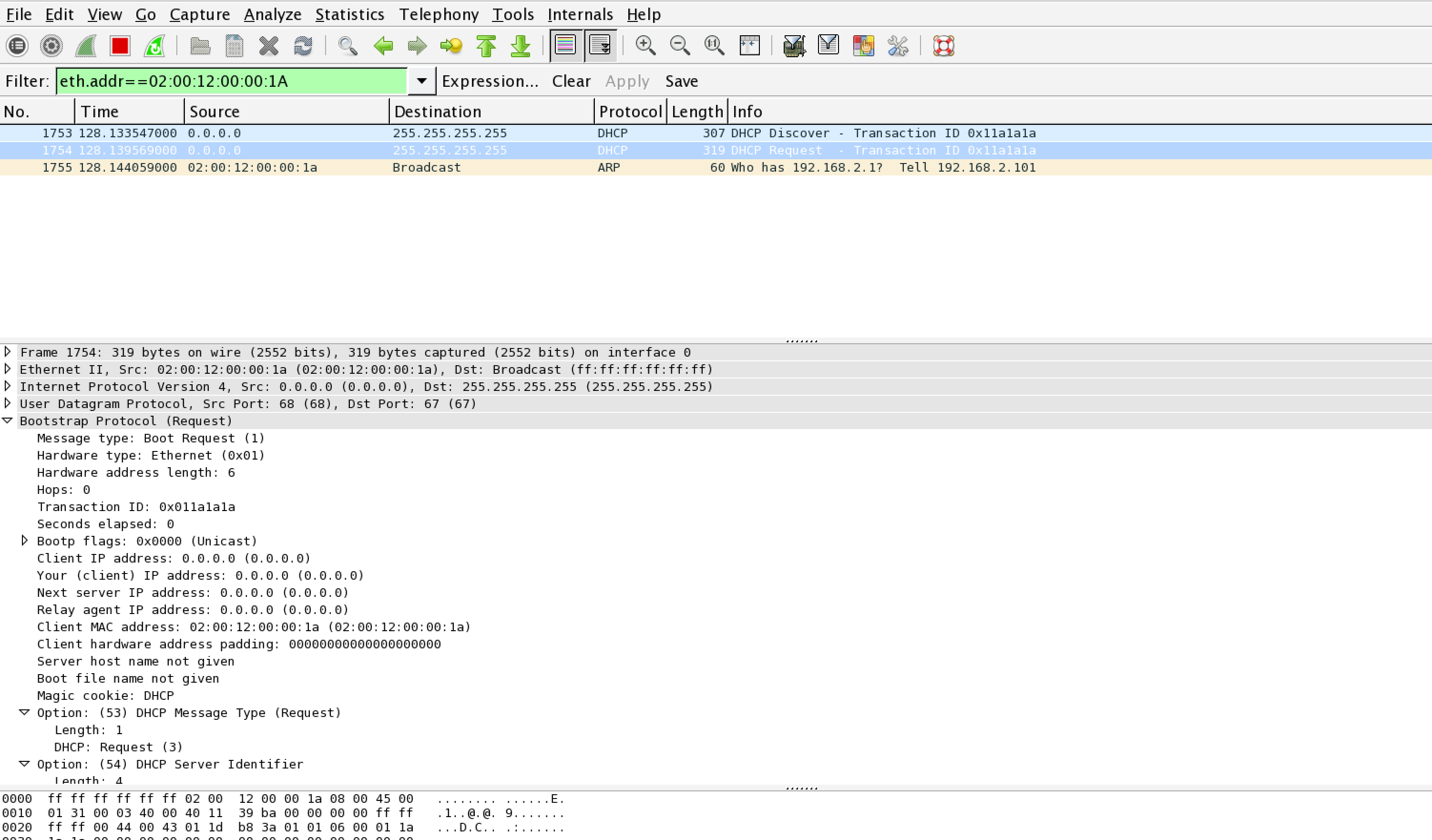
Vinz, are you getting the same issues with DHCP? can you post more details?
In my local tests, DHCP was fine, so it’s a bit hard for me to replicate this for a fix:
Attachments:
KeymasterI’m afraid there were no updates. So the change must have been local. Yes, currently there are several IP used. The one for data is correct: 23.239.13.18.
Lars, just as a note, I don’t think this is physical, nevertheless if you are unable to find the problem, you can send the unit back anytime to get a replacement.
-
This reply was modified 11 years, 8 months ago by
-
AuthorPosts