
- This topic has 3 replies, 2 voices, and was last updated 7 years, 6 months ago by
.
Viewing 4 posts - 1 through 4 (of 4 total)
Viewing 4 posts - 1 through 4 (of 4 total)
- You must be logged in to reply to this topic.
uRADMonitor. edodd55
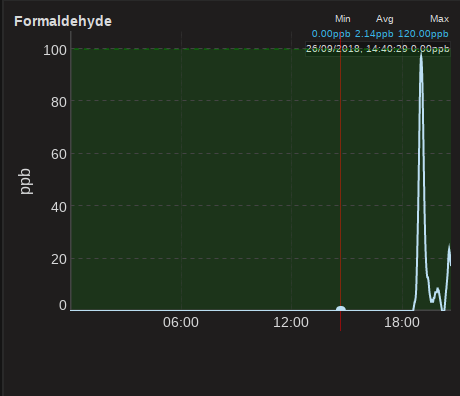
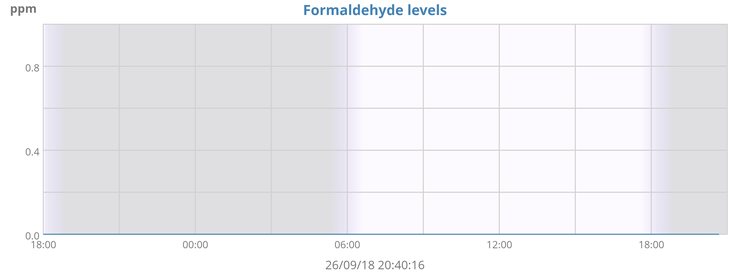
I have an A3, type:8 hw:105 sw:135 SI29BG, ethernet connected. Reading my formaldehyde values from the local (json) data, I always have a value of zero for formaldehyde. The dashboard shows varying values.
Here are graphs of locally collected values (daych20.png) and remotely stored values (Screenshot)
This is a sample of values from the monitor
RAD:18CPM
VOL:383V 21%
T:16.11C
P:100440Pa
H:45.88RH
VOC:197680
N:34.03dB
CH2O:0.00ppm
PM2.5:3ug/m^3
CO2:530ppm
UP:66154s WDT:31s/400s
 uRADMonitor
This is a bit strange, you should get a perfect match on formaldehyde. Please note the server returns it in PPB, as the local embedded webserver returns it in PPM. Make sure there are no digits lost there due to Integer operations trimming the complete values. Also make sure you local read operations are completed successfully, it is possible you sometimes get timeouts and your values stay 0.
Regardless of this, please note that the correct way to go about this is to use the Server API. You can find examples and full details on http://www.uradmonitor.com/dashboard
The local JSON is only offered as a bonus and for quick debug tests. It is important you use the Server API to get meaningful readings. Also because there is a calibration layer implemented only on the server side, that does some compensations for temperature and humidity on the models with the sensor placed inside (to correct aberrations caused by internal heating), but it also computes PM1 and PM10, and also VOC AQI otherwise not available locally.
Let me know if you need any help migrating to the Server API.
Radu
edodd55As I saw much much later……the local data was not always zero, and at times it gets to the maximum!
uRADMonitorPlease see the other thread on this.