Home › Forum › Hardware › Model D feedback › Reply To: Model D feedback
 uRADMonitor
Hi Scott, thanks for the input , I’ll get back to it in detail, also do the formatting, but tomorrow, as it was a very long day.
Try to format the sdcard in your PC. Also use the RESET button when / if needed. See my post above, there’s a picture with the button location.
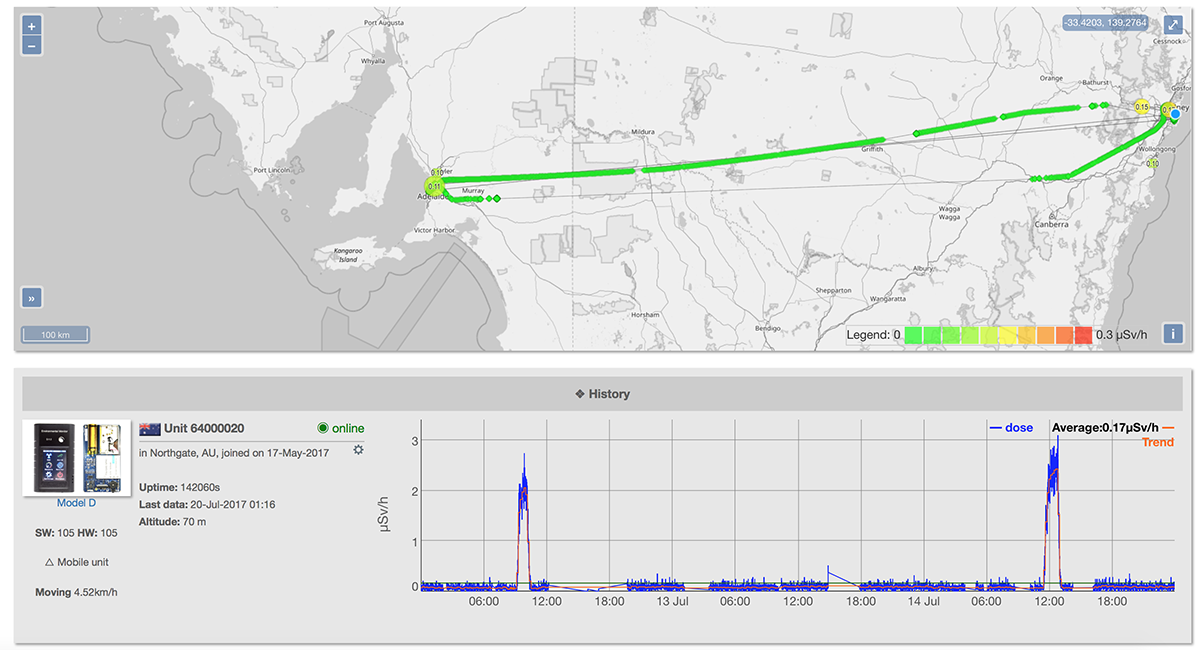
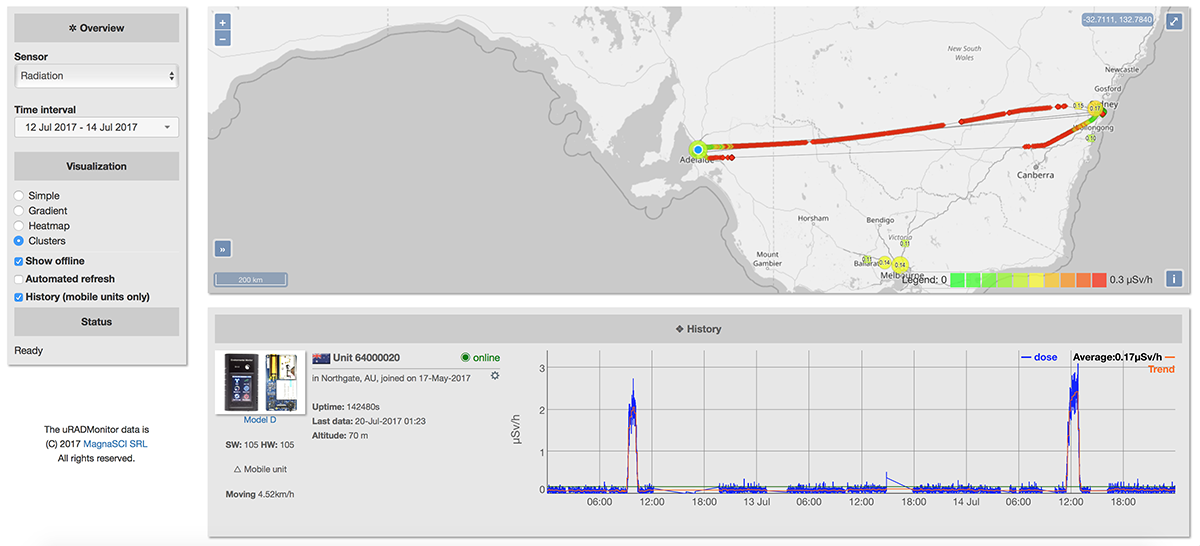
Your flight log is very interesting, this is a first I think. There was a bug with the colour representation, and I just fixed it, see pictures attached.
LE: I promised an answer.
Hardware
1. The PCB in mine seems a little loose and rattles if softly shaken lengthways. I suspect it might need a thin piece of medium- or high-density foam on the inside of the top and/or bottom plates
2. The power switch moves the entire PCB lengthways, before operating (see previous point)
There should have been a self adhesive foam installed inside the enclosure on the lid facing the PM2.5 sensor. The manufacturer left this out. Please get a piece of foam, they are affordable and easy to source, and secure the PCB. PCB movement is definitely not
ok and can impact the LCD connector.
3. How should we orient the device if sitting at desk (for example) – it seems as though there are sensor or antenna holes on all surfaces, except the curved sides, and the USB cable also complicates things
I envisioned it placed with the USB connector down, in vertical position. This position is not for charging. You might want to see this: https://www.uradmonitor.com/topic/uradmonitor-model-d-desktop-stand/
4. The lag on the touchscreen can be a few seconds, at times – I’ve noticed as much as 8-second jumps, when on the Measures screen
This is important as not knowing what happens can lead to LCD damage. The new features added as extended goals impacted the processing performance and the microcontroller was updated to partially compensate for that. But not entirely. What happens is that sometimes, while you press the screen, the microcontroller is busy reading sensors, communicating with the server, decoding GPS or writing to the SDCARD. What you need to do is tap and hold, gently, as the LCD is very sensitive and doesn’t need to be abused. It’s not an issue of touchscreen contact, but lack of processing power. This might be addressed in software too, perhaps in a future firmware I’ll be able to do the touchscreen driver code better and react to the touches with higher priority then the other subcomponents. Bottom line, please don’t force the LCD, instead click and wait a little if the touch is not recognised the first time.
5. What is the black antenna/sensor on the front, above the screen? It’s not described in the specifications on the website.
It’s a plastic cover for the GPS ceramic antenna
Battery
6. It won’t power up if connected to charger but it will charge after being powered up; so, if the battery is empty, you need to press the On button and then immediately connect power, otherwise it will power-down again
Please press and hold the on button. If there are any issues starting the unit , you will need to hit the reset button before attempting to press the ON button again.
7.It seems to power down if connected to a PC but then appears as USB-serial port; this is fine if you have AC USB adapters everywhere but means that you can’t use a PC/laptop to charge it and have it uploading at the same time
This is a glitch that will be fixed.
8. Are you planning to release firmware updates for the Model D? Is that what the USB-serial functionality is for?
Absolutely. All the other models received tens of firmware updates. Your feedback is what generally leads to these updates. I try to make it as good as possible.
9. The battery indicator didn’t reach full, from empty, after being connected to a 5V/1A USB charger for 8.5 hours uninterrupted, despite only drawing 0.5A; it does with a 5V/2A charger. This may have been location specific – at my office it can’t receive a GPS signal and the wireless is busy, so that may use more power
The charging rate is adjusted in hardware. It can be changed using a resistor.
The GPS uses a custom antenna. It needs a strong signal to get a lock (and also to keep it). Wireless can do a lot of interference on the GPS receiver.
10. Battery life seems to be about two-four hours
Battery life is dependant on WIFI and GPS use, but also the number of times the LCD is turned on. Disable WIFI when you don’t need it.
Software
General
11. There is no explanation for the colours of the icons on the top bar; I think I’ve established that grey means off, green means on and blue means connected
Yes, you are correct.
12. Waking up the screen shouldn’t also perform whatever action is under the area touched to wake-up; since the screen isn’t readable when off, the first touch should just wake it
I implemented this feature already, I’ll double check.
Wireless
13. Wireless config – if you were viewing/setting the Wi-Fi key and exit back to the Settings menu, when entering Wi-Fi settings again, the SSID button is selected but it displays the key
I’ll need to check this.
14. Wireless config – the keyboard shows each key as being depressed for each character used in the SSID or key
It only seems to connect to the configured SSID if its broadcast – is that correct?
The key refresh was left like that as refreshing each key would have consumed additional resources, which unfortunately are not available.
15.A single SSID is a moderate limitation, particularly given the method of configuration. A method of saving a couple of profiles would be handy, even if the profile has to be manually selected
Excellent suggestion, will keep this in mind for the next firmware update.
Offline
a.Could you add an option to automatically upload offline data when reconnected?
Yes.
b.The offline samples counter resets after power-cycle – I initially, wrongly, assumed that it was losing offline data after reboot (battery was drained)
The offline counter shows indications per session. Data is not lost.
c.Whilst uploading offline data, it doesn’t seem to be also uploading live data or adding it to the offline file, to be uploaded after the sync
That is correct. If it becomes possible, I will add this feature. But the idea is you will have a way to measure important data, eg. during a trip, then when you get home you sync all data. The model D is not intended as a monitor, instead a portable unit with multiple functions.
d.Whilst uploading, the battery indicator is hidden but the screen stays on – so it drains the battery quickly but you have no idea how much battery is left
Good suggestion, thank you.
e.If the battery runs out whilst uploading offline data, it starts again when another sync is initiated after powering back up
f.Estimated time for upload of 912 updates is 912 seconds however, for me, each update took ~5 seconds to upload, so it took ~95 minutes. This number could adapt over time, with a value saved to NVRAM or SD (wherever you save Wi-Fi settings), or at least adapt during the current sync session. Using my phone as a hotspot, it was taking ~7-8 seconds per sample.
Excellent, we definitely need these added to the firmware.
Measures
a.Barometric units – can this be changed to hPa or mbar (which are equivalent)? 101000 Pa seems silly for pressure, when weather services use 1010.0 for the same pressure
Yes
b.Switching the labels and values between sides on the Air Q screen would enable you to change the units from Pa to hPa without losing precision, although I doubt anyone would mind losing hundredths of hPa
Thank you, good suggestion.
“Alarm” on the notification bar doesn’t tell you which parameter is triggering the alarm
Indeed, this will be updated too.
All in one, this is very constructive feedback, and I can tell already that most of this will become implemented in the next firmware upgrade. Thanks for the contribution, Scott.