
- This topic has 2 replies, 2 voices, and was last updated 9 years, 7 months ago by
.
Viewing 3 posts - 1 through 3 (of 3 total)
Viewing 3 posts - 1 through 3 (of 3 total)
- You must be logged in to reply to this topic.
SaltoUYStation. SaltoUYStation
So, I’m no techie or coder, though I’ve worked in that realm some in the past and understand some things …been looking around in support for a tutorial on how to get API data through the method described by Radu and ecloud (e.g. http://data.uradmonitor.com/api/v1/devices/41000008/cpm). I’ve tried several versions using my ID and get {“error”:”Authentification failed”}.
I can run the JSON data request and that’s really cool, but am lost in figuring API commands. Is there a tutorial that clearly describes what data goes where?
Thank You!
 uRADMonitor
A more detailed tutorial is available on: https://www.uradmonitor.com/wordpress/wp-content/uploads/2017/01/uradmonitor_api_example_response.pdf
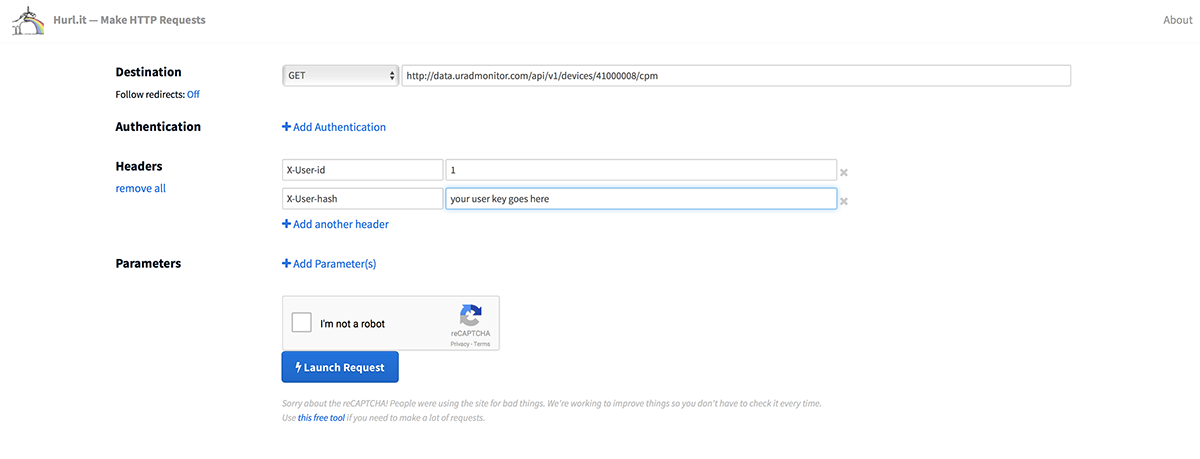
You will need to pass the user-id and the user-key as headers to the HTTP Get call (go to the dashboard , then open the API tab for the right values). Next, for the actual call, you can use extensions in Chrome for that (like DHC) or online tools like Hurl.it . See the pic for an example with the latter.
Alternatively , you can also use the “Data” tab in the dashboard to achieve the same thing, easier.
Feel free to post any questions on this, I’d love to help.
SaltoUYStationAwesome, thanks! Aha, so, much easier using JSON or CSV… cool. Will explore the other tools.